MacBook LCD EMC Number: Why It Matters When Replacing Your MacBook Screen
Introduction
When replacing a MacBook LCD screen, most buyers look for the model name or screen size. However, another important identifier that helps determine the correct display is the EMC number. Understanding your MacBook’s EMC number can make it much easier to find a compatible LCD replacement and avoid purchasing the wrong screen.
In this guide, we will explain what the EMC number is, how it varies between MacBook models, and why it is important to check it before buying a replacement LCD.
What Is a MacBook EMC Number?
The EMC number is a regulatory identification number assigned to Apple devices. It helps identify the specific hardware configuration of a MacBook model.
Unlike the MacBook name (such as MacBook Pro 13-inch or MacBook Air), the EMC number refers to the exact device variant, including the display assembly and internal components used in that particular model.
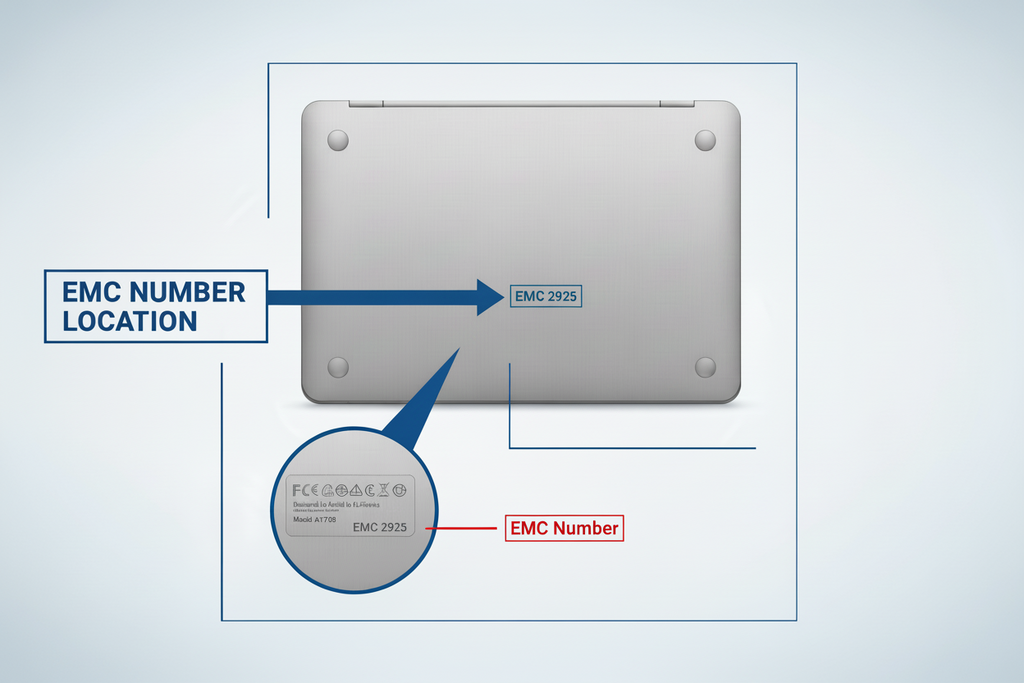
You can usually find the EMC number printed on the bottom case of the MacBook, near the model information.
How EMC Numbers Vary Between MacBook Models
Different MacBook models are assigned different EMC numbers because their internal hardware, display panels, and design specifications vary.
For example:
| MacBook Model | Model Number | EMC Number | Display Type |
|---|---|---|---|
| MacBook Pro 13-inch (2017) | A1708 | EMC 3164 | Retina LCD |
| MacBook Pro 13-inch (2018) | A1989 | EMC 3214 | Retina LCD |
| MacBook Air 13-inch (2020) | A2179 | EMC 3302 | Retina LCD |
| MacBook Pro 14-inch (2021) | A2442 | EMC 3650 | Liquid Retina XDR |
Although two MacBooks may look similar externally, the LCD panels and connectors may differ internally, which is why the EMC number helps confirm the correct screen compatibility.
Why the EMC Number Is Important Before Buying an LCD
When purchasing a replacement MacBook LCD, knowing the EMC number helps ensure you select the correct display assembly for your device.
Checking the EMC number can help with:
Accurate Compatibility
Different MacBook models use different LCD panels. The EMC number helps identify the exact version of the device.
Avoiding Incorrect Parts
Two MacBooks with similar screen sizes may use completely different display connectors or assemblies.
Simplifying the Buying Process
Sellers and repair technicians often use the EMC number to quickly confirm the correct replacement screen.
Preventing Installation Issues
Using an incompatible LCD may lead to display problems, connection issues, or improper fit inside the MacBook lid.
How to Find Your MacBook’s EMC Number
If you are planning to replace your MacBook screen, locating the EMC number is simple.
You can find it:
-
Printed on the bottom case of the MacBook
-
Inside System Information in macOS
-
On the original device packaging
Once you have the EMC number, you can match it with the correct MacBook LCD model before purchasing a replacement screen.
Final Thoughts
The EMC number plays an important role in identifying the correct MacBook model and its display components. While screen size and model name provide general information, the EMC number helps confirm the exact hardware configuration.
Before buying a MacBook LCD replacement, always check the EMC number to ensure compatibility. Using the correct screen not only guarantees a proper fit but also restores your MacBook’s display performance as intended.